

Quickstart
Find or Get Patient
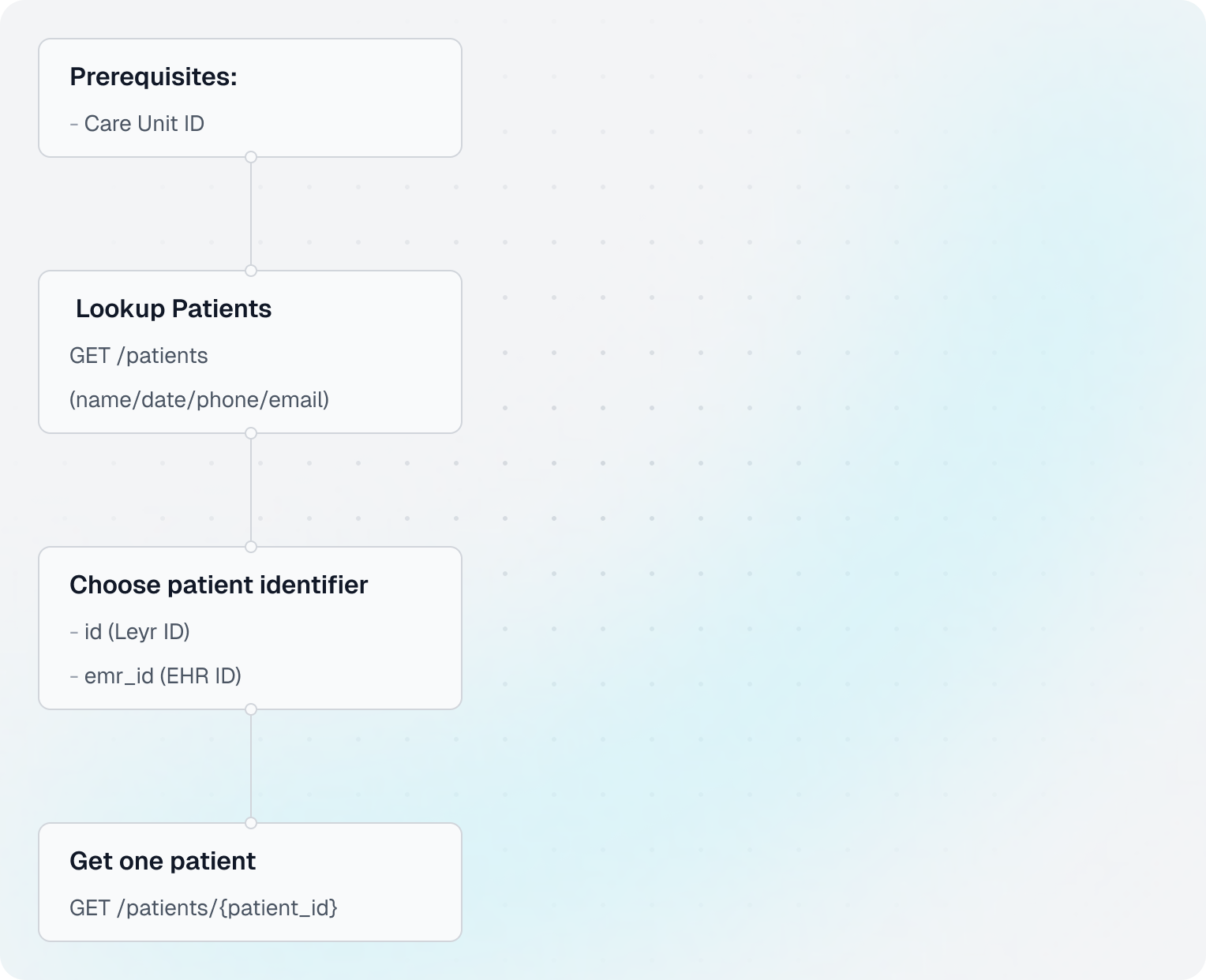
Use this guide to find an existing patient and choose the correct patient_id for follow-up requests like appointments, medical notes, and documents.
Find or Get Patient
Use this guide to find an existing patient and choose the correct patient_id for follow-up requests like appointments, medical notes, and documents.
This guide requires
care_unit_id from step 1 in Show Doctor's Availability before running patient lookup requests.Flow Overview
Code Example
Shared setup
import requests

CLIENT_ID = "your-client-id"
CLIENT_SECRET = "your-client-secret"
BASE_URL = "https://api.leyr.io/api"
EMR = "webdoc"

headers = {
    "x-leyr-client-id": CLIENT_ID,
    "x-leyr-client-secret": CLIENT_SECRET,
    "Content-Type": "application/json"
}

care_unit_id = "L0_1"
1. Lookup patients by demographics
response = requests.get(
    f"{BASE_URL}/emrs/{EMR}/care-units/{care_unit_id}/patients",
    headers=headers,
    params={
        "first_name": "Tolvan",
        "last_name": "Tolvansson"
    }
)
patients = response.json()

patient = patients[0]
print(f"Found patient Leyr ID: {patient['id']}")
print(f"EHR ID: {patient.get('emr_id')}")
2. Get one patient using patient_id
patient_id = f"emr_id:{patient['emr_id']}"
response = requests.get(
    f"{BASE_URL}/emrs/{EMR}/care-units/{care_unit_id}/patients/{patient_id}",
    headers=headers
)
patient_details = response.json()

print("✓ Patient loaded")
print(f"Name: {patient_details.get('first_name')} {patient_details.get('last_name')}")
print(f"Care Unit ID: {patient_details.get('care_unit_id')}")
patient_id formats
The patient_id path parameter supports multiple formats:
abc_12345(treated as EHR ID)emr_id:abc_12345se_personal_number:191212121212no_personal_number:26258605879nhs_number:9434765919
For full details, see Patient IDs.
Key Insights
- For patient-specific endpoints, use supported
patient_idformats (emr_id:*,se_personal_number:*, etc.). - Keep both
id(Leyr) andemr_id(EHR) for traceability and support workflows. - Use the Patients OpenAPI tag for request/response schema details when building UI mappings.
Next Steps
API Reference
Building with Leyr?
Talk to our team about your use case and discover how Leyr can help.
Book a discovery callAttach a Document
Learn how to upload files to patient records. Documents are files like lab results, imaging reports, consent forms, or any other files that need to be attached to a patient's medical record.
Create Patient
Use this guide to create or upsert a patient before booking appointments, writing medical notes, or attaching documents.