

Attach a Document
Attach a Document
Learn how to upload files to patient records. Documents are files like lab results, imaging reports, consent forms, or any other files that need to be attached to a patient's medical record.
care_unit_id and resource_id from Show Doctor's Availability, and a valid patient_id from Find or Get Patient or Create Patient. If the patient does not exist yet, create them first.Flow Overview
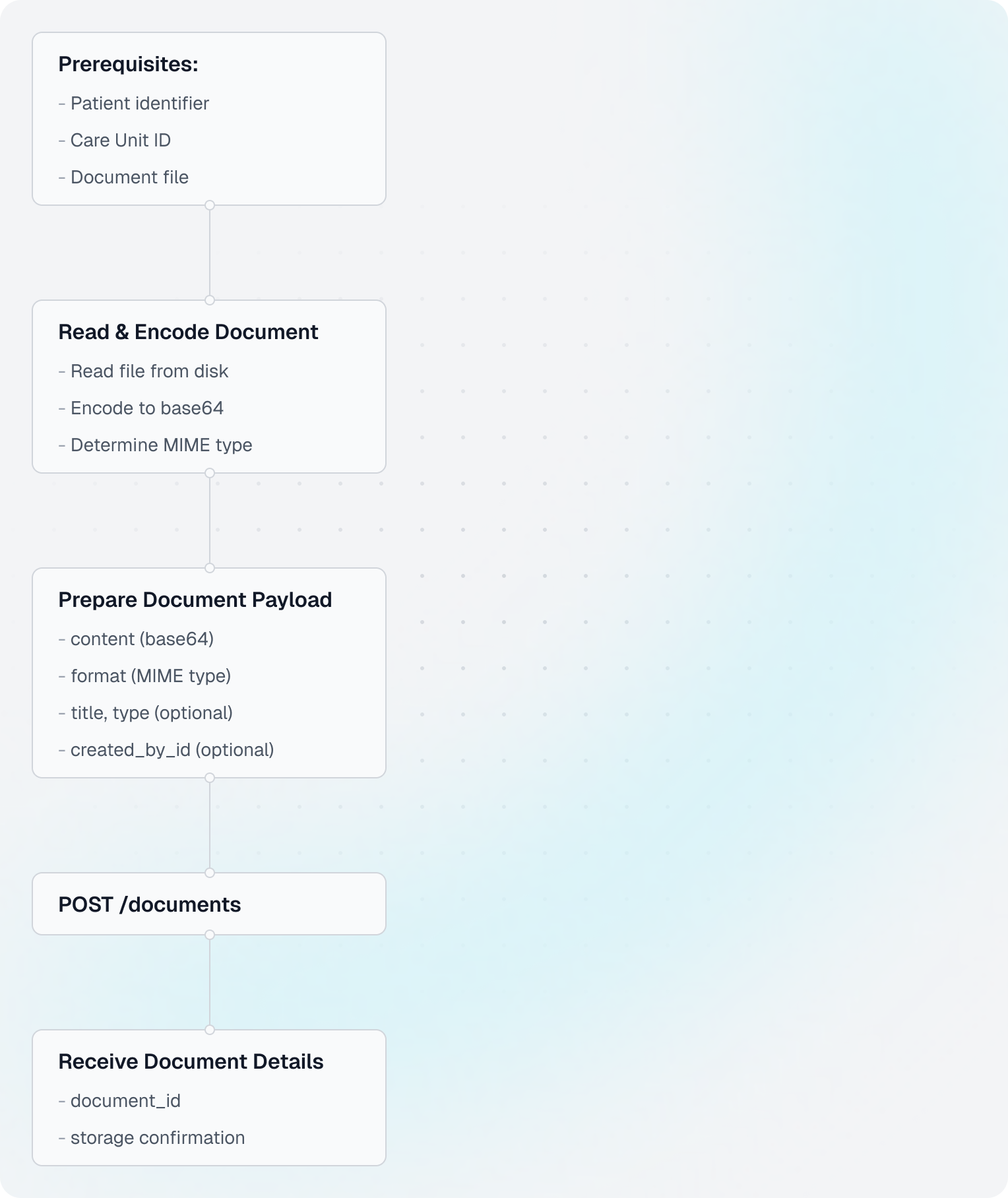
Understanding Documents
- Documents: Files attached to patient records (PDFs, images, lab results, scans)
- vs Medical Notes: Documents are binary files; medical notes are text-based clinical records
- Base64 Encoding: Binary files must be encoded to text for JSON transmission
- MIME Types: Specify file type (e.g.,
application/pdf,image/jpeg) - Common Use Cases: Lab reports, imaging results, consent forms, referral letters
Code Example
Shared setup
import requests
import base64
import mimetypes

CLIENT_ID = "your-client-id"
CLIENT_SECRET = "your-client-secret"
BASE_URL = "https://api.leyr.io/api"
EMR = "webdoc"

headers = {
    "x-leyr-client-id": CLIENT_ID,
    "x-leyr-client-secret": CLIENT_SECRET,
    "Content-Type": "application/json"
}

care_unit_id = "care-unit-123"
patient_id = "se_personal_number:191212121212"
resource_id = "resource-123"
file_path = "lab_results.pdf"
1. Read file and encode to base64
with open(file_path, "rb") as file:
    file_content = file.read()

base64_content = base64.b64encode(file_content).decode("utf-8")
2. Determine MIME type
You will very often know file format beforehand, e.g. if you know your system generates PDF summaries of the measurements, so you can as well provide it directly.
file_format, _ = mimetypes.guess_type(file_path)
3. Prepare document payload
document_data = {
    "content": base64_content,
    "format": file_format,
    "title": "Blood Test Results",
    "type": "Lab Result",
    "created_by_id": resource_id
}
4. Upload the document
response = requests.post(
    f"{BASE_URL}/emrs/{EMR}/care-units/{care_unit_id}/patients/{patient_id}/documents",
    headers=headers,
    json=document_data
)

document = response.json()
5. Read key values from the response
print("✓ Document uploaded successfully!")
print(f"  Document ID: {document['id']}")
print(f"  Title: {document['title']}")
print(f"  Type: {document.get('type')}")
print(f"  Format: {document['format']}")
print(f"  Size: {len(file_content)} bytes")
patient_id usage
Use patient_id in path parameters with one of these formats:
abc_12345(treated asemr_id)emr_id:abc_12345se_personal_number:191212121212(when supported by the EHR)
Use Find or Get Patient to discover identifiers and Patient IDs for full format support.
Common MIME Types
Here are common MIME types for medical documents:
| File Type | Extension | MIME Type |
|---|---|---|
.pdf | application/pdf | |
| JPEG Image | .jpg, .jpeg | image/jpeg |
| PNG Image | .png | image/png |
| Word Document | .doc | application/msword |
| Word Document (new) | .docx | application/vnd.openxmlformats-officedocument.wordprocessingml.document |
| DICOM Image | .dcm | application/dicom |
| Text File | .txt | text/plain |
File Size Limits
Be aware of file size limitations:
import os

# Check file size before uploading
file_size = os.path.getsize(file_path)
max_size = 20 * 1024 * 1024  # 20 MB

if file_size > max_size:
    print(f"Error: File too large ({file_size} bytes)")
    print(f"Maximum allowed: {max_size} bytes")
else:
    # Proceed with upload
    with open(file_path, "rb") as file:
        file_content = file.read()
    # ... rest of upload code
Retrieving Documents
1. Get all documents for a patient
response = requests.get(
    f"{BASE_URL}/emrs/{EMR}/care-units/{care_unit_id}/patients/{patient_id}/documents",
    headers=headers
)

documents_response = response.json()
documents = documents_response["items"]

print(f"Found {len(documents)} documents")
for doc in documents:
    print(f"  - {doc['id']}: {doc.get('title')} [{doc.get('format')}]")
2. Get one document and decode content
document_id = documents[0]["id"]
response = requests.get(
    f"{BASE_URL}/emrs/{EMR}/care-units/{care_unit_id}/patients/{patient_id}/documents/{document_id}",
    headers=headers
)

document = response.json()

if "content" in document:
    file_content = base64.b64decode(document["content"])
    with open("downloaded_document.bin", "wb") as f:
        f.write(file_content)
    print("Downloaded: downloaded_document.bin")
Best Practices
- Validate Files: Check file size and type before uploading
- Use Descriptive Titles: Help users identify documents easily
- Set Type When Useful: Use
typeto categorize documents (e.g., Lab Result, Consent Form) - Compress Large Files: Consider compressing large documents before upload
Next Steps
Explore other API features:
- Write a Medical Note - Create clinical documentation
- API Guides - Advanced topics and best practices
API Reference
For detailed API documentation, see:
Building with Leyr?
Write a Medical Note
Learn how to create medical notes for patient records. Medical notes are clinical documentation written by healthcare providers during or after consultations.
Find or Get Patient
Use this guide to find an existing patient and choose the correct patient_id for follow-up requests like appointments, medical notes, and documents.