

Show Doctor's Availability
Show Doctor's Availability
Learn how to discover available timeslots for booking appointments. This guide walks through the complete flow from finding care units to checking doctor availability.
care_unit_id from step 1 is required in all subsequent API calls. You will also reuse resource_id, healthcare_service_id, and timeslots in later guides.Flow Overview
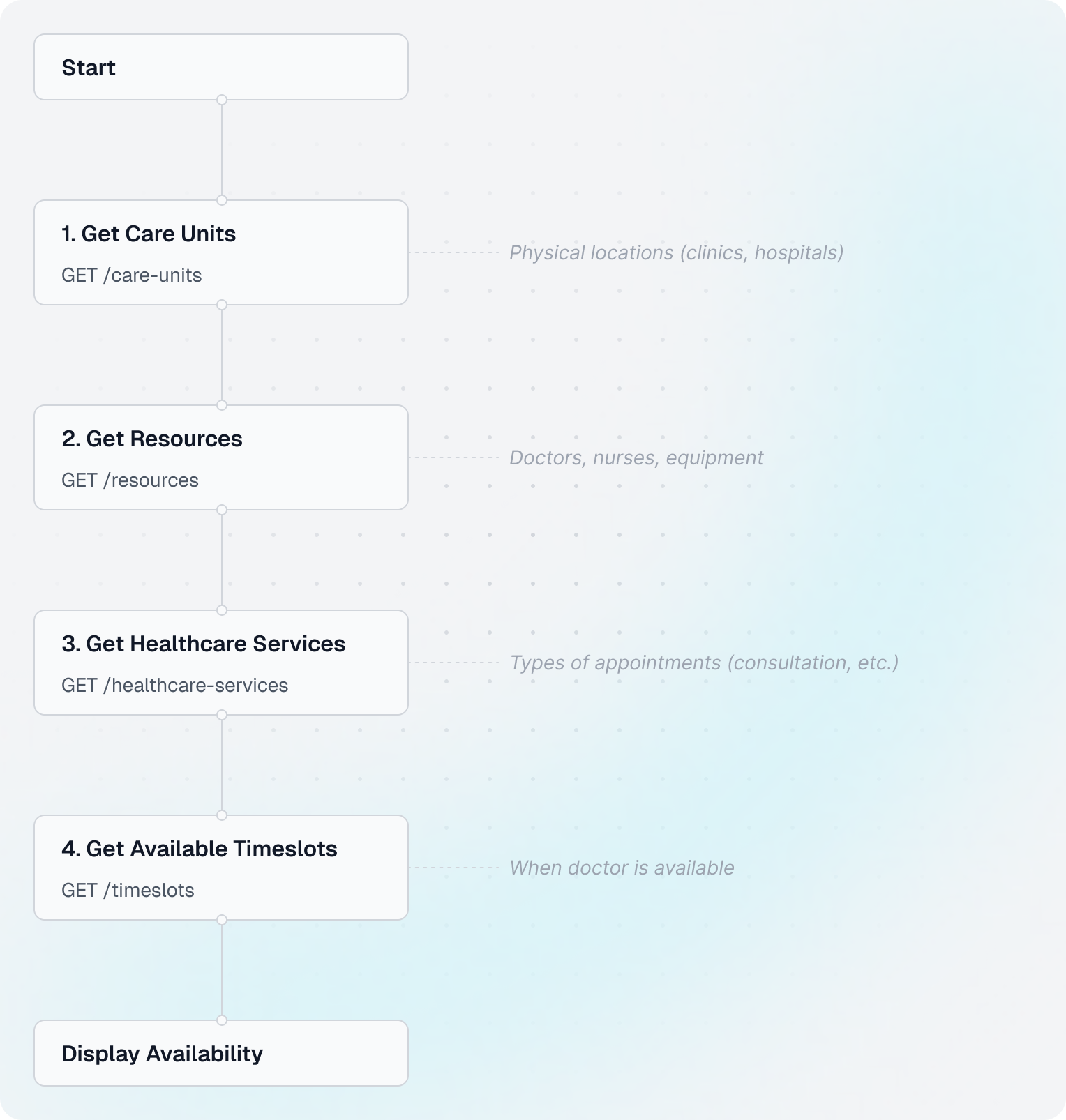
Understanding the Concepts
Before diving into code, let's understand the key concepts:
- Care Units: Physical locations where healthcare is provided (e.g., "Main Clinic", "Downtown Office")
- Resources: People or equipment that can be scheduled (e.g., "Dr. Smith", "MRI Machine")
- Healthcare Services: Types of appointments offered (e.g., "General Consultation", "Follow-up Visit")
- Timeslots: Available time windows when a resource can be booked
Code Example
Shared setup
import requests
from datetime import datetime, timedelta
from zoneinfo import ZoneInfo

CLIENT_ID = "your-client-id"
CLIENT_SECRET = "your-client-secret"
BASE_URL = "https://api.leyr.io/api"
EMR = "webdoc"

headers = {
    "x-leyr-client-id": CLIENT_ID,
    "x-leyr-client-secret": CLIENT_SECRET,
    "Content-Type": "application/json"
}
1. Get care units
response = requests.get(
    f"{BASE_URL}/emrs/{EMR}/care-units",
    headers=headers
)
care_units = response.json()

care_unit = care_units[0]
care_unit_id = care_unit["id"]
2. Get resources
response = requests.get(
    f"{BASE_URL}/emrs/{EMR}/care-units/{care_unit_id}/resources",
    headers=headers
)
resources = response.json()

doctor = resources[0]
resource_id = doctor["id"]
3. Get healthcare services
response = requests.get(
    f"{BASE_URL}/emrs/{EMR}/care-units/{care_unit_id}/healthcare-services",
    headers=headers
)
services = response.json()

service = services[0]
service_id = service["id"]
4. Get available timeslots
start = datetime.now(tz=ZoneInfo("Europe/Stockholm")).isoformat()
end = (datetime.now(tz=ZoneInfo("Europe/Stockholm")) + timedelta(days=30)).isoformat()

response = requests.get(
    f"{BASE_URL}/emrs/{EMR}/care-units/{care_unit_id}/timeslots",
    headers=headers,
    params={
        "start": start,
        "end": end,
        # "resource_id": resource_id,  # Add filters as needed
        # "healthcare_service_id": service_id  # Add filters as needed
    }
)
timeslots = response.json()
5. Display a few results
print(f"Found {len(timeslots)} timeslots. First 5:")
for slot in timeslots[:5]:
    print(f"- {slot['start']}")
Key Insights
Working with IDs
Leyr uses two types of identifiers throughout the API:
id- Leyr's internal identifier. Always use this for API requests (booking appointments, filtering timeslots, etc.)emr_id- The original EHR system's identifier. This is provided for informational purposes and debugging with the EHR, but should not be used in Leyr API calls
For example, when booking an appointment, use resource.id and service.id, not resource.emr_id.
2024-03-22T14:30:00+01:00). Make sure to URL-encode these values when passing as query parameters.Filtering Results
You can filter timeslots by resource, service, or both:
# Get timeslots for a specific doctor only
params = {
    "start": start,
    "end": end,
    "resource_id": resource_id  # Filter by doctor
}

# Get timeslots for a specific service only
params = {
    "start": start,
    "end": end,
    "healthcare_service_id": service_id  # Filter by service type
}

# Get timeslots for specific doctor AND service
params = {
    "start": start,
    "end": end,
    "resource_id": resource_id,
    "healthcare_service_id": service_id
}
Next Steps
Now that you know how to find available timeslots, learn how to book an appointment:
Book an AppointmentAPI Reference
For detailed API documentation, see:
Building with Leyr?
Quickstart
Get started with Leyr API in minutes. This guide walks you through common integration scenarios with complete, working code examples in Python and JavaScript.
Book an Appointment
Learn how to create appointments for patients using available timeslots. This guide shows you how to book appointments once you've found available times.